Description
In this section, multiple competitors can be tracked at once. This gives a convenient way for quickly evaluate competitors performance and activities on Instagram. This is very useful for performing competitive analysis and learning insights that can help in developing growth strategies.
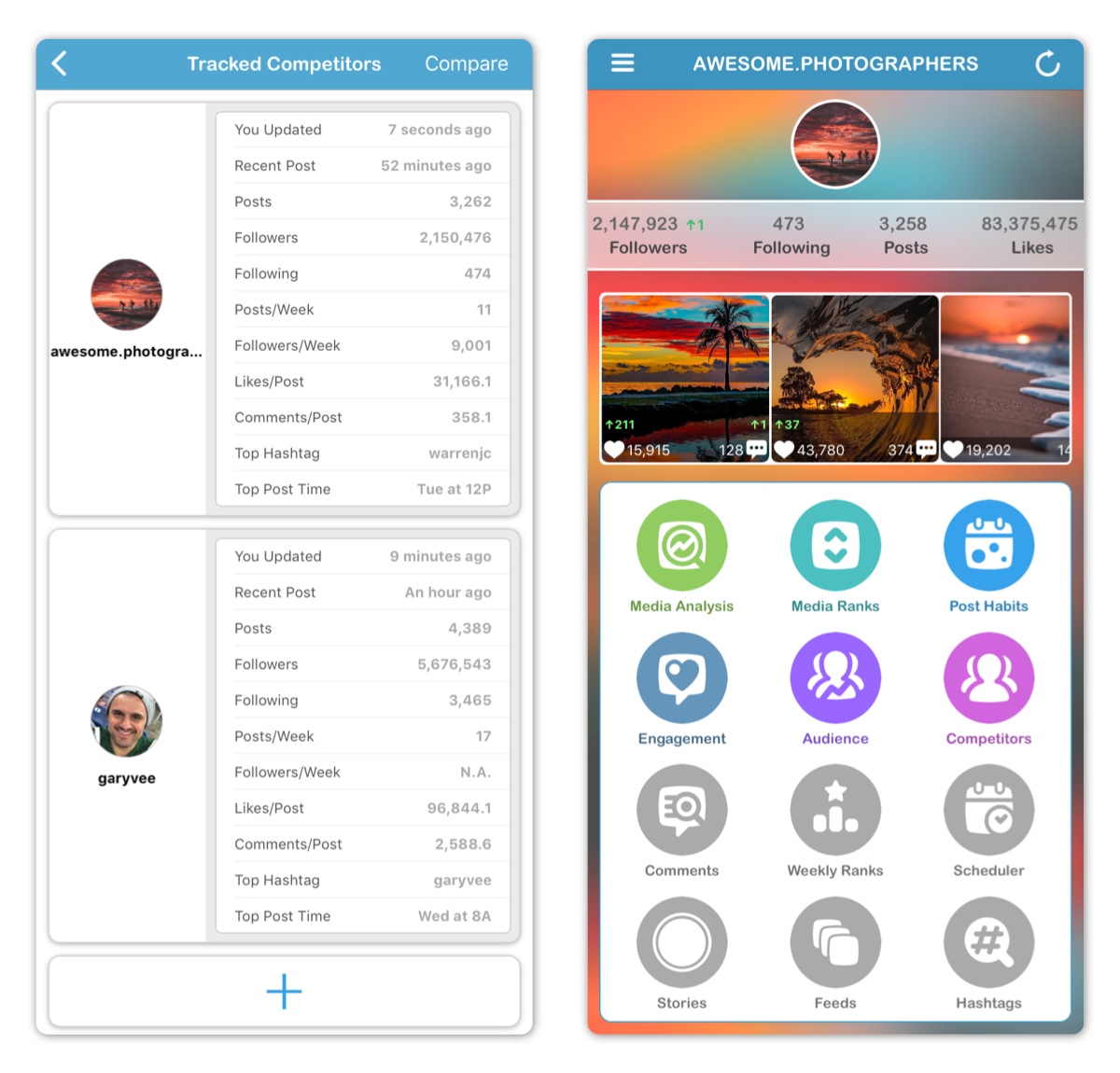
In this section, a new competitor can be added by tapping the large + button. After typing exact competitor username name, competitor will be added to the list.
Tapping on a competitor cell allows for the following:
- Showing Competitor's Profile on Instagram
- Accessing Competitor's Account Dashboard
- Analyzing Competitor's Media
- Deleting Account
The following information are available for each competitor:
- Last Update Time (Updated from Competitor's Account Dashboard)
- Followers Number
- Following Number
- Posts per Week
- Followers per Week
- Average Likes per Post
- Average Comments per Post
- Top Hashtag
- Top Post Time
Some information are not available until account has been updated from Competitor's Account Dashboard.
Tapping the Compare button on the top right allows for perform Accounts Comparison.
NOTE: This section is only available for Instagram business accounts with Facebook login. Learn more here.
Competitor's Account Dashboard
Accessing Competitor's Account Dashboard allows for loading competitor's information just like doing so for own accounts.
The following information are available on Competitor's Account Dashboard
- Followers Number *
- Following Number *
- Posts Number *
- Total Likes Number *
- Total Comments Number *
- Average Likes per Post *
- Average Comments per Post *
- Average Followers per Week
- Average Posts per Week
- Recent Posts
* Changes since last update are shown for all those numbers. Green number with up arrow indicate an increase while red number of with a down arrow a decrease since last update.
Recent posts sub-section shows information about number of likes and comments for each posts with changes since last update.
The following sections are available from Competitor's Account Dashboard:
- Media Analysis
- Media Ranks
- Post Habits
- Engagement Analysis
- Audience Growth (Part of of Audience Analysis)
Accounts Comparison
This section allows for comparing own accounts to competitor accounts or compare competitor accounts against each other in 15 different metrics. This reveals valuable information about different accounts and how they compare to each other.
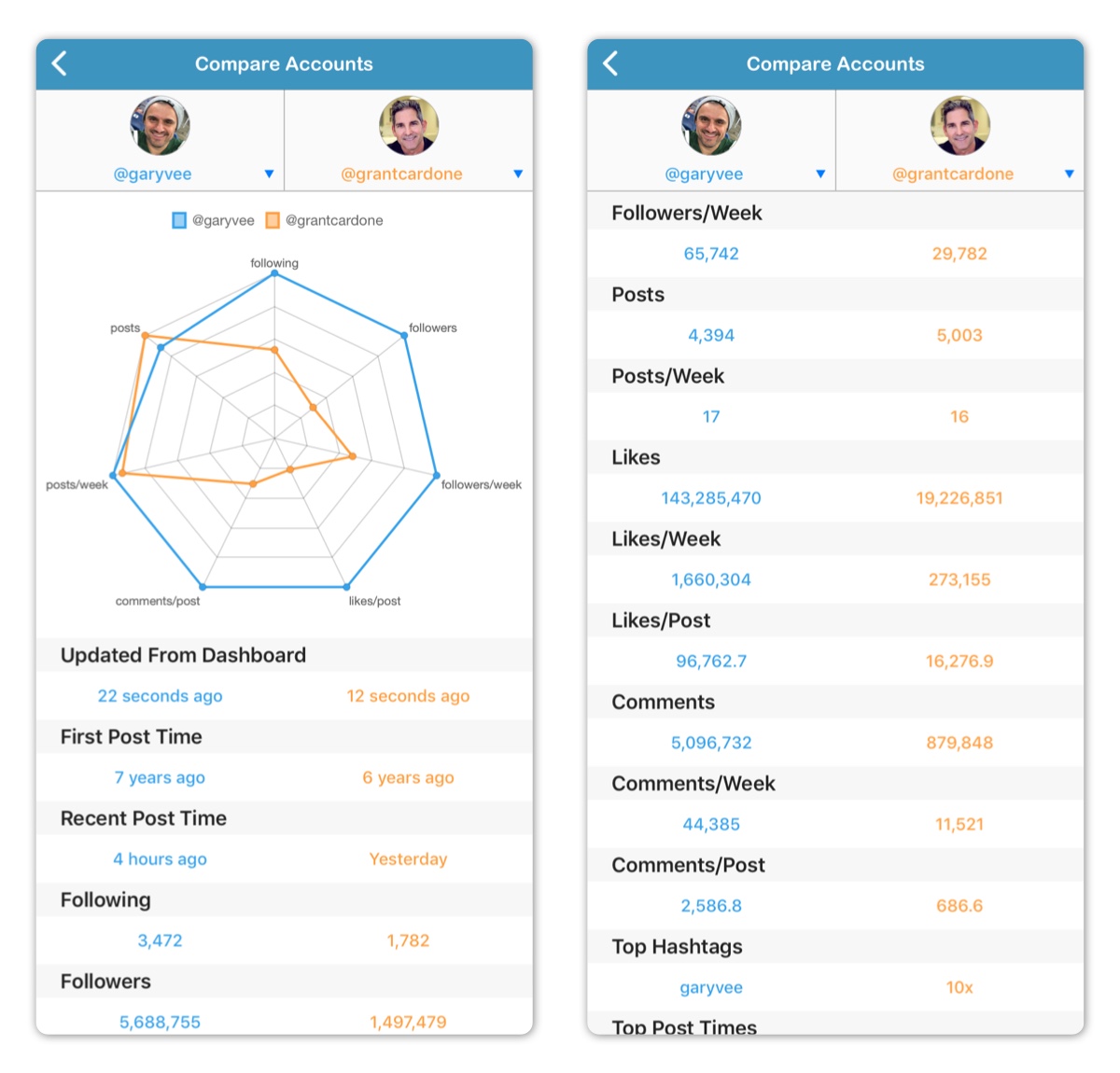
Two accounts will be automatically selected upon opening this section. Different accounts can selected from the account pull down menus at the top of the screen.
A polar chart is used to give a quick overview of how the 2 selected accounts compare to each other in the following 7 dimensions:
- Following Number
- Followers Number
- Average Followers per Week
- Posts Number
- Average Posts per Week
- Average Likes per Post
- Average Comments per Post
The closer a value is to the center of the chart, the smaller the value is for that dimension. In the above example, the first user is scoring much higher in 5 dimensions, however the second user is scoring higher in the number of posts dimension.
Note that average followers per week value may take a few days after adding a competitor account before it can be estimated.
Below the chart, the 2 selected accounts are compared by the following:
- Updated Time (Updated from Competitor's Account Dashboard)
- Fist Post Time
- Recent Post Time
- Following Number
- Followers Number
- Average Followers per Week
- Posts Number
- Average Posts per Week
- Likes Number
- Average Likes per Week
- Average Likes per Post
- Comments Number
- Average Comments per Week
- Average Comments per Post
- Top Hashtags
- Top Post Times
Required Subscription
This section requires Premium Subscription
Comments
0 comments
Please sign in to leave a comment.