Description
This section analyzes all posts to reveal many insights that are shown in different formats. It's one of the most powerful and unique feature about InsTrack app. The insights received help in developing the rights strategies to meet growth targets and optimize content. This is even more useful when analyzing media of competitors to uncover information that can't be found otherwise.
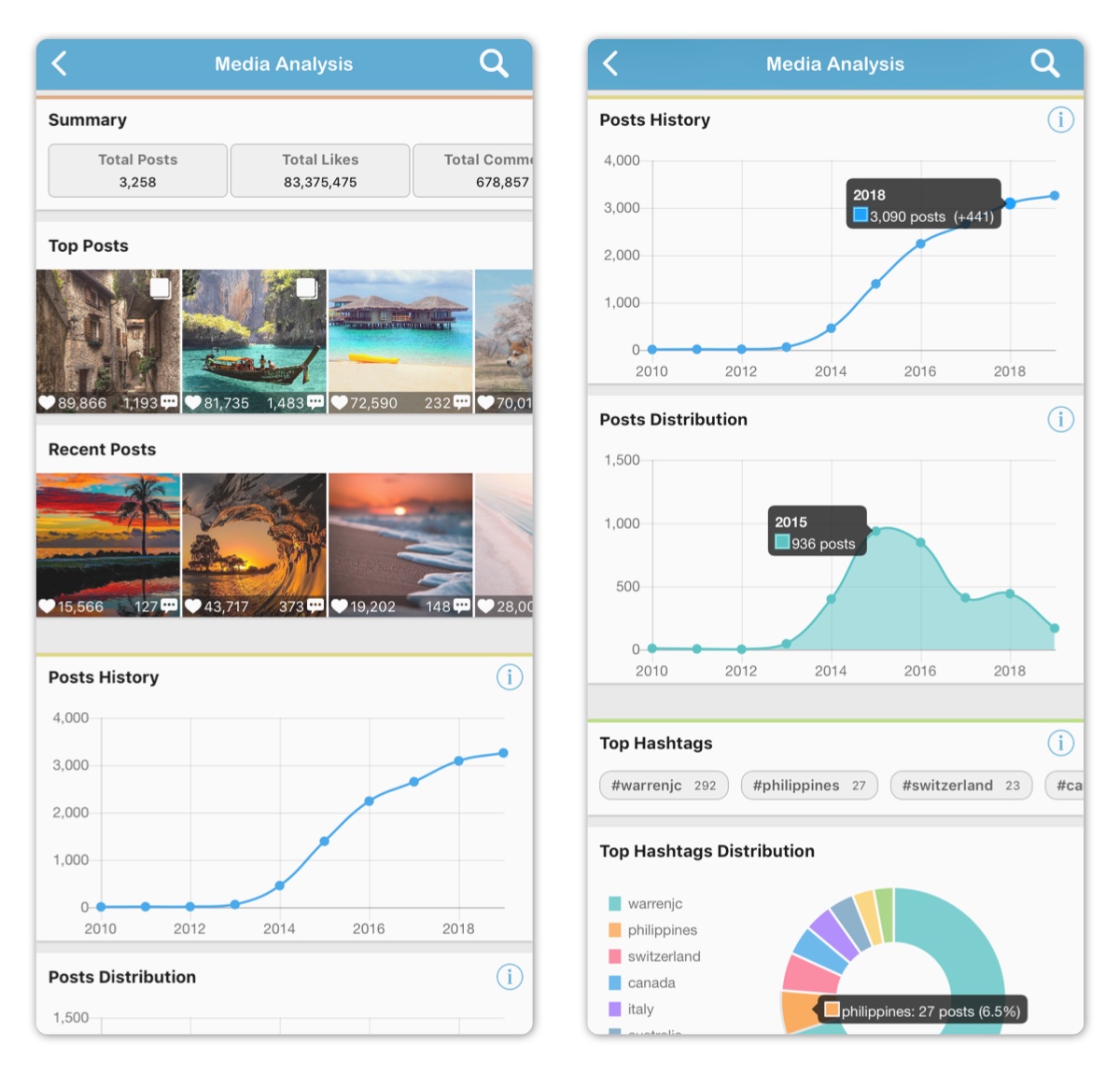
It contains the following sub-sections
- Summary
- Posts
- Hashtags
- Post Types
- Mentions
- Languages
- Filters *
- Geolocation *
- Countries *
- Locations *
* Those sub-sections are only available for accounts logged in with Instagram as those information are part of the legacy Instagram API but not the new Instagram Graph API.
1. Summary
This sub-section includes the following information:
- Number of Posts
- Number of Likes
- Number of Comments
- Average Likes per Post
- Average Comments per Post
- Oldest Post Time
- Recent Post Time
- Top Posts (Highest Engagement)
- Recent Posts
Tapping on a post allows for the following:
- Enlarging post
- Playing video for video type posts
- Viewing full caption
- Viewing post information and insights
- Tapping on an insight value brings insight description
- Accessing post comments by tapping comments section
- Opening own media on Instagram by tapping Instagram button on the top right
- Saving or sharing own image type post by tapping action button on the top
2. Posts
This sub-section includes the following charts:
- Posts History: Cumulative number of posts over time
- Post Distribution: Number of posts at different time points
Tapping on the Posts History chart reveals the number of posts made until a time point along with the number of new posts made at that time point.
Tapping on the Posts Distribution chart reveals the number of posts made in a time point.
Double tapping on a chart time point shows posts made during that time point only. See Advanced Filters.
3. Hashtags
This sub-section includes the following:
- Top Hashtags: Number of posts including hashtag is shown
- Top Hashtags Distribution Chart
Tapping on a hashtag allows for the following actions:
- Searching Hashtag on Instagram
- Copying Hashtag
- Copying All Top Hashtags
- Showing Only Posts with This Hashtag. See Advanced Filters.
- Hiding Posts with This Hashtag. See Advanced Filters.
Tapping on the distribution chart reveals the number of posts included a hashtag along with percentage.
4. Post Types
This sub-section includes the following:
- Top Post Types: Number of posts for each type is shown
- Top Post Types Distribution Chart
Tapping on a post type allows for the following actions:
- Showing Only Posts with This Type. See Advanced Filters.
- Hiding Posts with This Type. See Advanced Filters.
Tapping on the distribution chart reveals the number of posts of a type along with percentage.
5. Mentions
This sub-section includes the following:
- Top Mentions: Number of posts mentioning user is shown
- Top Mentions Distribution Chart
Tapping on a user name allows for the following actions:
- Showing User Profile on Instagram
- Showing Only Posts Mentioning User. See Advanced Filters.
- Hiding Posts Mentioning User. See Advanced Filters.
Tapping on the distribution chart reveals the number of posts of mentioning a user with percentage.
6. Languages
This sub-section includes the following:
- Top Languages: Number of posts in each languages is shown
- Top Languages Distribution Chart
Tapping on a language allows for the following actions:
- Showing Only Posts in This Language . See Advanced Filters.
- Hiding Posts in This Language. See Advanced Filters.
Tapping on the distribution chart reveals the number of posts in a language along with percentage.
7. Filters
This sub-section includes the following:
- Top Filters: Number of posts using each filter is shown
- Top Filters Distribution Chart
Tapping on a filter allows for the following actions:
- Showing Only Posts with This Filter . See Advanced Filters.
- Hiding Posts in This Filter. See Advanced Filters.
Tapping on the distribution chart reveals the number of posts using a filter along with percentage.
8. Geolocation
This sub-section includes the following:
- Number of Posts with Geolocation Info
- Geolocation Distribution Chart
Tapping on a geolocation cell allows for the following actions:
- Showing Only Posts with Geolocation Info. See Advanced Filters.
- Hiding Posts with Geolocation Info. See Advanced Filters.
Tapping on the distribution chart reveals the number of posts with geolocation info along with percentage.
9. Countries
This sub-section includes the following:
- Top Countries: Number of posts in each country is shown
- Top Countries Distribution Chart
Tapping on a country allows for the following actions:
- Showing Only Posts in This Country . See Advanced Filters.
- Hiding Posts in This Country. See Advanced Filters.
Tapping on the distribution chart reveals the number of posts in a country along with percentage.
10. Locations
This sub-section includes the following:
- Top Locations: Number of posts in each location is shown
- Top Locations Distribution Chart
Tapping on a location allows for the following actions:
- Showing Only Posts in This Location . See Advanced Filters.
- Hiding Posts in This Location. See Advanced Filters.
Tapping on the distribution chart reveals the number of posts in a location along with percentage.
Required Subscription
This section requires Premium Subscription
Comments
0 comments
Please sign in to leave a comment.