Description
This section is important for accounts with highly engaged audience as it makes it easy to view all received comments, sort those comments in different ways, apply different filters and search through them by keywords. This makes it very efficient to manage comments and interact with engaged users to encourage more engagement and reciprocity.
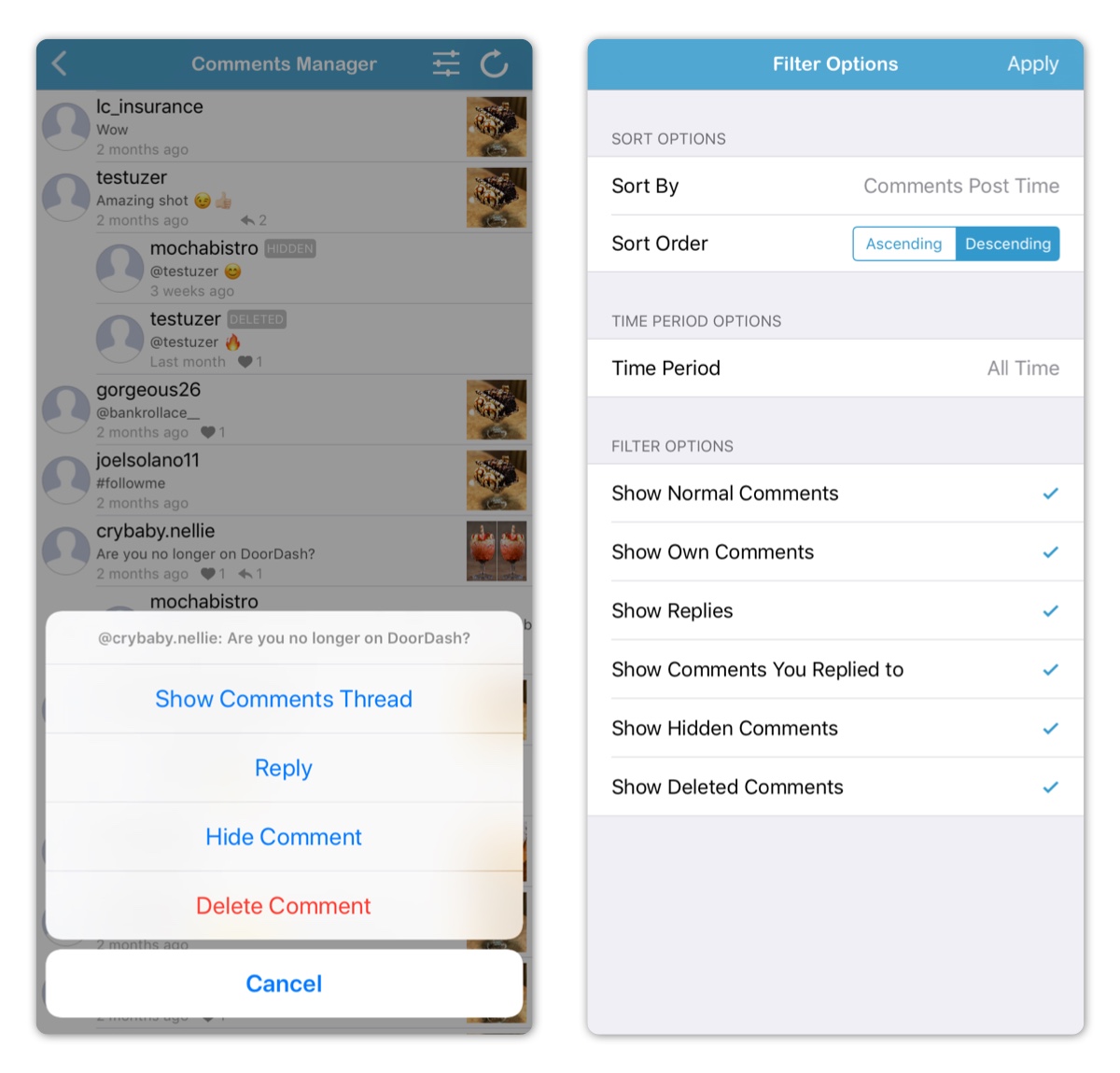
General Features
In this section all collected media comments are sorted by post time and in descending order. Most recent comments are shown at the top.
Search bar can be viewed by pulling the comments list down. This allows for searching by keywords in comment texts or commenter username.
Tapping on user image allows for the following:
- Opening user profile on Instagram
- Showing all media commented on by user
- Showing all comments received by user
Tapping on a media allows for the following:
- Enlarging media
- Playing video for video type media
- Viewing full caption
- Viewing media information and insights
- Tapping on an insight value brings insight description
- Accessing media comments by tapping comments section
- Opening own media on Instagram by tapping Instagram button on the top right
- Saving or sharing own image type media by tapping action button on the top
Tapping on a comment shows comments thread with that comment being highlighted.
Deleted comments are marked with a red label.
Instagram Business Account Only Features
The following features are only available for Instagram business accounts with Facebook login. Learn more here.
Tapping on a comments allows for the following:
- Showing comments thread
- Replying to comment
- Hiding comment
- Deleting comment
If some comments haven't been loaded, a refresh button will be shown on top right to load all comments. Loading comments can be take long time, and it can be stopped at any time to process new collected comments.
Comments Filter Options
Advanced filter options can be opened by tapping the filter options button on the top right.
Comments can be sorted by the following:
- Post Time (Default)
- Activity Time (By default activity time is the same as post time, however for comments with replies, activity time is the post time of most recent reply)
- Comments Likes Count
- Comments Replies Count
- Comment Text Length
Comments can be sorted in following orders:
- Descending (Default)
- Ascending
Comments can be filtered by the following time periods:
- All Time (Default)
- Year
- Quarter
- Month
- Week
- Day
- Hour
The following filter options are available:
- Show/Hide Normal Comments.
- Tip: Hiding normal comments allows for focusing on deleted comments if there are any.
- Show/Hide Own Comments
- Tip: Hiding own comments allows for focusing on other user comments.
- Show/Hide Replies
- Tip: Hiding replies allows for focusing on main comments.
- Show/Hide Comments You Replied to
- Tip: Hiding comments you replied to allows for focusing on comments that might need action.
- Show/Hide Hidden Comments
- Tip: Hiding hidden comments allows for focusing on normal comments.
- Show/Hide Deleted Comments
- Tip: Hiding deleted comments allows for focusing on normal comments.
Filter options can be reset to default values from the top left.
Required Subscription
This section requires no subscription as it's FREE.
Comments
0 comments
Please sign in to leave a comment.